
MacBook
 MacBook
Turn over your mobile. The number Axxxx is engraved in small characters on the lower hull.

The easiest way to identify your Mac: enter your AXXXX reference or follow our visual selection guide to find out about our repairs and prices, or book an appointment directly.
The code starts with A followed by 4 figures. This is the quickest way to identify a Mac before requesting a repair.
Turn over your mobile. The number Axxxx is engraved in small characters on the lower hull.
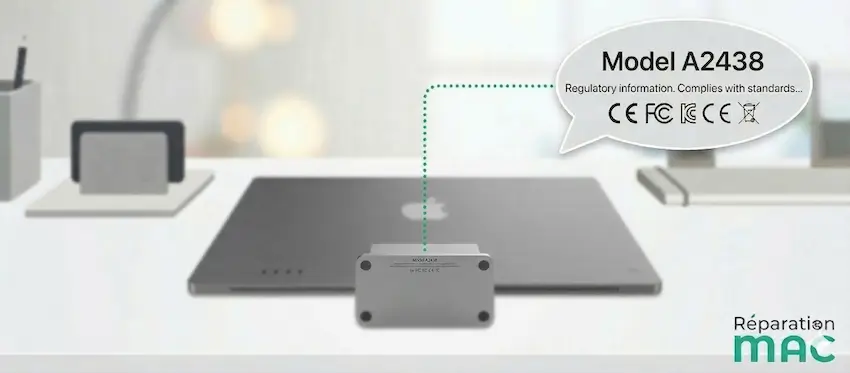
Look at the bottom of the foot on recent ones, or to the back of the screen on older models.

Return the device. The number Axxxx is engraved on the lower face.

On the rear panel Tower/Rack, or under the cylinder for the 2013 model.
The «About this Mac» menu does not display this number. It is physically engraved on the device or its original box.
Manually select the family, then the year and screen size. The pathway is designed to guide you to the most appropriate service.
Tip: for even more precise identification, use the Model number if you see the Axxxx code engraved on the underside of the appliance.

Click on the Apple menu () at the top left, then "About this Mac". The model name, year and chip (M1, M2, M3, M4, M5) will be displayed directly.
Turn your Mac over. Visit serial number (format FVFxxxx or C02xxxx) is engraved very small on the shell. Enter it on checkcoverage to obtain the exact name of the model.
Check the barcode label on the back of the box. It contains the Axxxx model number, the complete configuration and the Apple reference (e.g. MJLQ2LL/A).
Whether you buy it from Apple, Fnac, MediaMarkt or online, the exact model number of your machine is always given, along with the year and configuration.
The Serial Number is a unique alphanumeric code specific to your machine, used for warranty and AppleCare tracking purposes. The model number (e.g. A2338) refers to a whole series of Macs manufactured in the same year with the same design and the same features. It is this number Axxxx we need to prepare your repair and order the right parts.
Yes, this is perfectly normal. The macOS system displays the commercial name (e.g. "MacBook Air 13 inch 2020") and the internal identifier (e.g. MacBookAir10,1), but not the physical model number. The Axxxx number is only engraved on the aluminium casing of your computer or printed on the original box.
Our tool references 80 models covering all the Apple families (MacBook Pro, MacBook Air, MacBook Neo, MacBook, iMac, iMac Pro, Mac mini, Mac Studio and Mac Pro) from 2006 to 2026. If your Mac is older or if the number is illegible, call us or come and see us in our workshop at Berchem by appointment for on-site identification.
Since 2021, Apple has made the structure of its new serial numbers completely random and has removed public access to its verification databases (the old checkcoverage tool no longer decodes the model from the serial). Third-party serial number search tools no longer work reliably for recent Macs. The Axxxx model number is now the only universal and 100% reliable identification method for all Macs, old and new.
The easiest way: click on the Apple menu () at the top left, then on "About this Mac". The year will appear directly in the window. You can also use our "Manual selection" tab above: choose your device type, then the year and screen size to obtain the corresponding model number.
Turn your Mac over and look for the number Axxxx engraved on the bottom shell (laptops) or under the foot (iMac). This number is always accessible even if the machine does not start. If the text is worn or illegible, check the original box or purchase invoice. You can also e-mail us a photo of the casing and we will identify your model free of charge.
The Axxxx number (e.g. A1398) identifies the hardware family and may cover several years of production. The EMC number (e.g. 2909) is more precise and identifies a specific revision within the same family. The Model Identifier (e.g. MacBookPro11,4) is an internal software code used by macOS. Our tool uses the Axxxx as an entry point, then allows you to select the exact year via the EMC number for complete identification.
24-hour diagnosis, free no-obligation quote and 180-day guarantee on repairs. Over 15 years of Apple expertise in Brussels.

 iMac
iMac Mac mini / Studio
 Mac Pro